


One Tap Away
4.6941.00 Reviews
App Specs
- Version
- 2.1.45
- Updated On
- License
- Free
- Downloads
- 100,000+
- Developer
- CSC ServiceWorks
- Categories
- Lifestyle
- Platform
- Android
Screenshots
 Analysis by AppCompare
I judge a utility by whether it helps with a real task, not by how many shortcuts it can promise. One Tap Away is presented as a way to bring everyday services closer, and that idea is most convincing when a small errand would otherwise mean switching between screens or figuring out where to begin. I would think of it less as a magic button and more as a possible shortcut in a familiar routine: useful when it fits the place and task at hand, but not a substitute for every service involved.
The errand starts before the app does
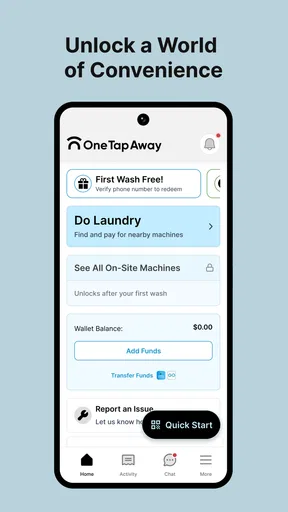
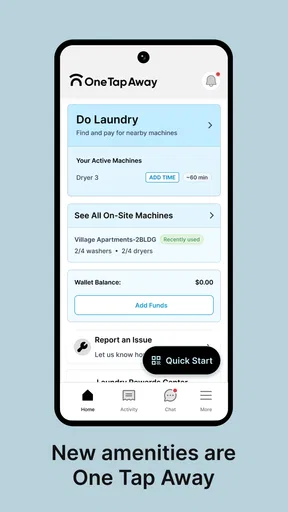
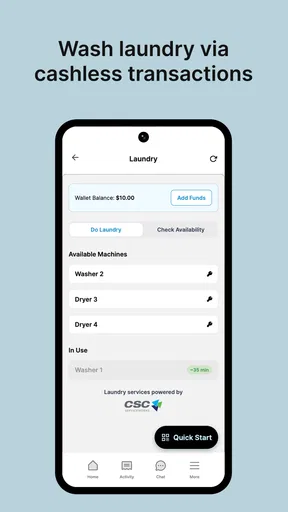
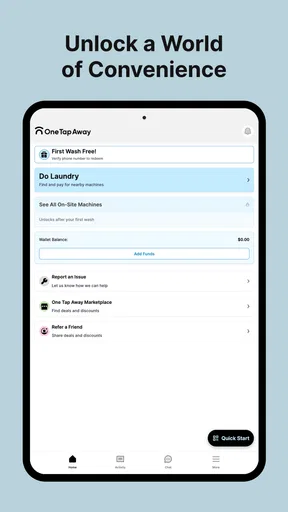
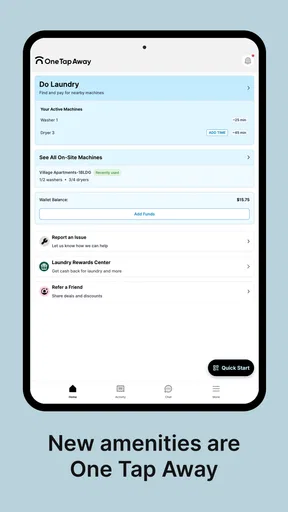
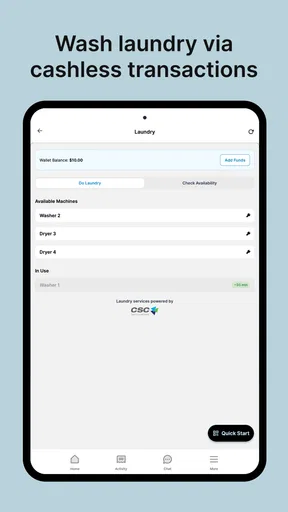
Laundry is a good example of why a focused service can be helpful. You may be carrying a basket, trying to remember which machine you planned to use, and fitting the chore between work, class, or other errands. A lifestyle app from CSC ServiceWorks makes sense in that setting because the need is practical and immediate. The useful question is whether the app is relevant to the laundry service available where you are, not whether it can replace every general-purpose organizer on your phone.
That distinction matters. A broad productivity app can keep notes, reminders, and many kinds of shortcuts together, while a service-focused app is valuable when it helps you interact with the service you actually need. Before relying on it for a time-sensitive trip, I would check that it applies to the laundry setup I intend to use. If it does, opening the app before I arrive gives me a chance to understand the available path rather than trying to sort it out while juggling bags.
Turning a laundry stop into a clear sequence
My practical approach would be to start with the immediate job: identify the laundry location and the equipment or service I need, then use the app as the first place to check how to proceed. Keeping that goal in mind is more useful than tapping around without a plan. If the app presents the relevant next step, I can follow it; if not, I can fall back on the instructions or assistance available at the location instead of assuming that every machine or building works the same way.
A small but useful habit is to open the app before unloading the basket. That gives me a moment to confirm I am in the right place and to notice any steps that need attention before a machine is occupied. It also helps separate two kinds of trouble: a question about how to use the app and a physical issue with a washer or dryer. Those may need different solutions, and treating them as one problem can waste time.
For a shared laundry room, I would also avoid treating a phone screen as the only source of truth. The physical machine, posted directions, and the app need to agree for the task to feel straightforward. If one part of that handoff is unclear, I would pause before committing to a cycle rather than guessing. That is not a glamorous feature, but it is the kind of cautious workflow that prevents a minor confusion from becoming a bigger interruption.
Where the handoff matters
The app sits between me and a real-world service, so its usefulness depends on a handoff: I need to move from the screen to the correct machine and complete the task there. That is a different experience from using a notes app, where the whole job may stay on the phone. A laundry workflow can involve the building, the machine, and the app, so I would keep the phone accessible but not assume that the digital step covers every instruction or exception on site.
Worth Reading Before You Choose

Flipboard Shows What News Apps Must Do Beyond the Feed

Switching to Android Auto Means Rethinking Your Driving Routine

Google Calendar Makes a Crowded Week Easier to Manage

Ludo King Makes the Most of the Minutes Between Plans

Baby Panda World Brings Quick Play to Modern Phones, but Its Game Library Feels Busy

ESPN’s Live Game View Makes Following Close Games Easier
One non-obvious trade-off is that a single place to begin can reduce searching, yet it can also create a point of dependence. If I am in a hurry, I want the app to make the next action clearer; I do not want to spend the visit troubleshooting a screen when a posted instruction or a staff member can resolve the issue faster. I would use the app as a route into the service, while keeping the physical directions in view as a sensible backup.
This is also why I would not recommend building a whole personal organization system around a specialized laundry app. If my main need is a calendar, a collection of reminders, or a cross-service checklist, a dedicated organizer is a better fit. The benefit here is narrower: help with a laundry-related task in a setting where the app is relevant. A narrower tool can be more convenient than a general one, but only when it matches the errand.
First Impressions
First things first, downloading One Tap Away was a breeze. Whether you're on Android or iOS, getting started is as simple as heading to the app store and hitting that download button. Once installed, I was greeted with a sleek and intuitive interface. It’s minimalist, which I appreciate, because who needs unnecessary clutter? Right off the bat, the app asks for a few permissions, but nothing too invasive—just enough to ensure a smooth experience.
Features Galore
Now, let's talk features. The app is designed to be a jack-of-all-trades, bringing everything from reminders and notes to quick access to your favorite apps under one roof. The main feature is its customizable dashboard. You can set it up to include your most-used apps, recent contacts, and even quick shortcuts to specific settings like Wi-Fi or Bluetooth. It’s like having a personal assistant right in your pocket.
One of my favorite features is the smart reminders. You can set them based on time or location, making it super handy for those of us who tend to forget things as soon as we walk out the door. Plus, the notifications are subtle yet effective, ensuring you’re reminded without feeling bombarded.
User Experience
Using it has been a smooth experience. The app runs without a hitch, and I haven’t noticed any lagging or crashing, which is a big win in my book. The developers have clearly put a lot of thought into making it user-friendly. The learning curve is almost non-existent. Within minutes, I was customizing my dashboard and setting up new shortcuts like a pro.
Another cool aspect is the ability to sync across devices. Whether I was on my phone or tablet, my settings and preferences were always in sync. It’s perfect for those of us who switch between devices throughout the day.
Does it Stand Out?
In a sea of productivity apps, you might wonder if it has what it takes to stand out. While the app doesn’t reinvent the wheel, it does simplify your digital life in a meaningful way. Its strength lies in its ability to consolidate multiple functionalities into one intuitive platform. It’s all about efficiency and ease of use.
Plus, the app’s design is a breath of fresh air. The developers have struck a nice balance between aesthetics and functionality. It’s pleasing to the eye without sacrificing usability.
For this kind of everyday convenience, I would compare it with the alternatives I already use rather than expect it to replace them outright. A phone’s built-in tools are often enough for a simple reminder or a quick settings change; a general organizer is better when I need to manage a larger project. The advantage of a dedicated app is having a more direct route to the relevant task. The trade-off is that I need to learn whether its shortcuts genuinely save steps in my routine or merely add another screen to check.
That makes the app most appealing to someone who likes a compact starting point and is willing to spend a little time arranging it around personal habits. A student might want a quick way to reach frequently used tools between classes; someone with a busy workday may value having common actions in one place. On the other hand, if I rarely use shortcuts or already have a simple system that works, installing another organizer may create more maintenance than convenience. I would keep only the entries I reach for often and remove anything that turns the dashboard into a second app drawer.
Practical details that shape the choice
The app is free, and its Everyone age rating makes it broadly accessible, though that does not mean every household member will find the same setup useful. CSC ServiceWorks is the developer behind it. It has an average rating of 4.5 from around 3.7 thousand ratings, with over 100 thousand installs and 686 written reviews. Those figures suggest that people have tried it in meaningful numbers, but I would still judge it by whether its particular tools suit my own habits.
It was released on September 23, 2024, and the current version is 1.9.26. On Android, it requires version 7.0 or later. Those details are practical checks before installing: I would confirm that my device meets the minimum and make sure I am getting the current version rather than relying on an old impression of how the app works. The app’s “one tap” idea is only useful if the phone and the setup are ready when I need them.
A realistic test would be to use it for a week of ordinary routines, not to populate every possible shortcut on day one. I would start with a few actions I already perform repeatedly, then notice whether I reach them faster and whether the dashboard stays easy to scan. If I keep forgetting to open the app, that is useful feedback: the workflow may not be important enough to deserve a dedicated place. If I use it naturally, I can add another shortcut later rather than making setup a project in itself.
There are also sensible limits to what I would expect from any app that bridges a phone and a service. A slow connection, a device issue, an unclear instruction, or a mismatch between the screen and the physical setup can interrupt the process. I would not start a task that depends on the app at the last possible moment, and I would keep a practical fallback in mind. For laundry, that might simply mean checking the machine’s own directions before assuming a phone-based step has handled everything.
Final Thoughts
So, would I recommend it? Absolutely! It’s a versatile tool that brings convenience to the forefront. Whether you’re a student juggling assignments, a professional managing a hectic schedule, or just someone who likes to keep things organized, this app has something for everyone.
Sure, it might not replace every single app on your phone, but it does a fantastic job of integrating the most important ones into a single, accessible platform. If you’re looking for an app that makes life a little simpler, it is definitely worth a try. So, why not give it a go? You might just find it’s the missing piece you’ve been looking for.
Pros
- User-friendly interface makes navigation a breeze.
- Quick setup with minimal permissions required.
- Highly responsive with no noticeable lag.
- Variety of features tailored for diverse needs.
- Regular updates ensure app security and performance.
Cons
- Limited customization options for advanced users.
- Occasional ads can interrupt the user experience.
- Requires stable internet for optimal performance.
- Some features locked behind a paywall.
- No offline mode
- limiting use without internet.
FAQs for One Tap Away
What is the main purpose of One Tap Away?
One Tap Away is designed to simplify your daily tasks by providing a centralized platform for quick access to essential tools and features. Whether you need a quick reminder, a to-do list, or a way to manage your calendar, this app aims to streamline your workflow with just a single tap.
Is One Tap Away available for both Android and iOS devices?
Yes, One Tap Away is available for both Android and iOS platforms. The app is optimized for each operating system to ensure smooth performance and user experience. You can find it on the Google Play Store for Android devices and the Apple App Store for iOS devices.
Does One Tap Away require an internet connection to function?
One Tap Away offers both online and offline functionality. While some features, like syncing across devices or accessing cloud-based tools, require an internet connection, many of the app's essential functions, such as reminders and to-do lists, can be accessed offline.
Are there any in-app purchases or subscriptions in One Tap Away?
One Tap Away offers a free version with basic features. However, to unlock advanced tools and remove ads, a subscription is available. The app provides flexible options for monthly or yearly plans, allowing users to choose according to their needs and budget.
How secure is my personal data in One Tap Away?
One Tap Away prioritizes user privacy and data security. The app uses encryption to protect your information and follows strict privacy policies to ensure your data is not shared with third parties. Regular updates also ensure that security measures are up to date.


